
Create Google Meet links for online appointments
Automatic Google Meet creates a meeting for each eligible online booking. It uses the host’s Google Calendar connection.
Where to go: Settings → Integrations → Google Meet
Before you start
Add an Online appointment location, assign the relevant staff and services, and use an eligible plan. The host’s primary calendar must be writable and support Meet.
Prepare the online location
In Business & locations, add an Online appointment location. Assign the staff to it and check that the service can use that location and those staff.
Connect each Google host
In Integrations → Google Meet, choose Connect beside the staff host and complete Google consent. An existing Google Calendar connection can be reused; there is no separate Meet account to connect.
Select automatic Google Meet
Choose Use automatic Google Meet. Check the displayed status and any setup message. A unique conference is created through the Google Calendar appointment event when the online booking qualifies.
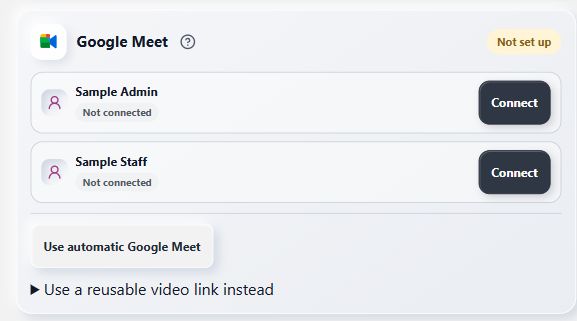
Connect the host, then choose automatic Google Meet.
- Connect the host
Verify the meeting or choose a reusable link
Check a fictional confirmed online appointment and its customer joining details. If automatic meetings are unsuitable, expand Use a reusable video link instead, select the provider, enter your reusable link and save. That link is shared across bookings; it does not create a new room each time.
What to expect
Eligible confirmed online appointments receive meeting details once the provider has created the conference. A pending meeting should be checked before telling a customer it is ready.
Common questions
Why is a Meet link missing?
Check the assigned host, Google connection, online location and automatic-Meet setting. The host’s primary calendar must be writable and report support for Meet conferencing.
Does cancellation immediately disable an old Meet URL?
Bookimatic removes its calendar event and clears the stored join link. Google controls when a previously issued Meet code expires.
Checked against the app on 5 November 2026
Screens show the Bookimatic interface with fictional sample data. Names, dates and addresses are examples.