
Choose how customers pay for appointments
Choose the payment method for each service. The options available depend on Bookimatic’s payment availability and your store’s setup.
Where to go: Settings → Add a service → How customers pay
Before you start
Decide whether customers book free of charge, pay at the appointment or need an enabled online-payment option. Keep the service price accurate.
Open the service’s payment options
In Add a service, create or open the service and find How customers pay. The service price and payment policy work together; check both before saving.
Use an available option
Choose No payment required for a free booking, or Pay at the appointment when you will collect payment later. Save the service after changing its policy.
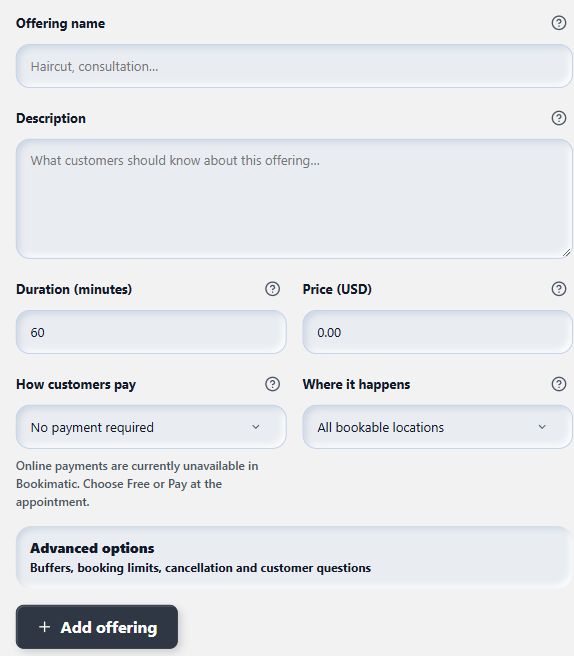
Use the payment options enabled for your store; a disabled choice is not activated simply by adding Shopify billing.
View full-size imageUnderstand disabled online choices
Pay-now and deposit choices are available only when Bookimatic enables them for the store and the relevant plan and Shopify setup allow them. Adding a Shopify payment method alone does not remove a Bookimatic availability restriction. If the app says online payments are unavailable, contact support rather than promising customers checkout payment.
Check confirmation and refunds
Where online payments are enabled, a paid booking is confirmed only after Shopify payment has been verified. Cancelling an appointment in the merchant schedule does not automatically refund the payment or change Shopify order state. Check refunds separately in Shopify.
What to expect
The service uses an available payment policy. Customers receive clear expectations about whether they owe anything at the appointment.
Common questions
Why does the app say online payments are unavailable?
Bookimatic controls access to its online-payment flow separately from Shopify’s own payment-method settings. Free and pay-at-appointment bookings can be used while online payment is unavailable.
Does cancelling an appointment refund it?
Not from the merchant schedule’s cancellation action. Review the Shopify payment and refund state and complete the appropriate refund process separately.
Checked against the app on 5 November 2026
Screens show the Bookimatic interface with fictional sample data. Names, dates and addresses are examples.