
Add staff, business hours and time off
Tell Bookimatic who can take appointments and when the business is open. Add holidays and other absences as time off.
Where to go: Settings → Staff; Business & locations
Before you start
Add your booking locations first if staff work at a specific venue. Use the timezone where the business operates.
Add a staff member
Open Settings → Staff. Enter the name, choose a booking location and select Add staff member. New members start with the Staff role. Their card appears in Your team.
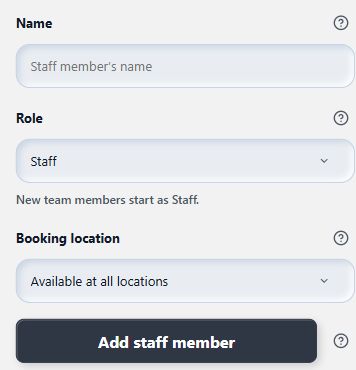
Add the person here; their saved card appears in Your team.
- Staff name
- Booking location
- Add staff member
Assign the right services
Open each saved service under Add a service and assign the staff who can deliver it in Advanced options. Check that their booking location is suitable for that service.
Set weekly business hours
Open Business & locations → Business hours. Enable the working days and enter the start and end times. Add a break where needed. Choose Save business hours. Saving applies these hours to all active staff; it does not move existing appointments.
Block time off
Return to Staff, open the person’s card and choose Time off. Enter the start and end date and time, then choose Add time off. Check the list to confirm the absence is saved.
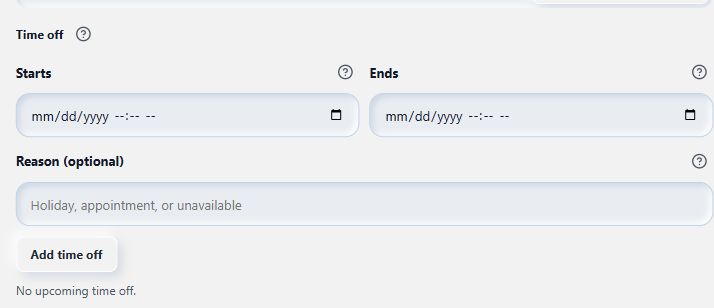
Block a holiday or absence for the selected person.
- Time off begins
- Time off ends
What to expect
Bookimatic combines business hours, assigned services, existing bookings and time off when calculating available times.
Common questions
Does adding staff give them access to Shopify Admin?
No. A Bookimatic staff record describes who can take appointments. Shopify Admin access is managed separately in Shopify.
Can I save different weekly hours for each person here?
The current Business hours editor applies the same weekly hours to all active staff. Use the person’s Time off tab to block individual absences.
Checked against the app on 5 November 2026
Screens show the Bookimatic interface with fictional sample data. Names, dates and addresses are examples.